Globe locator map
Difficulty: moderate
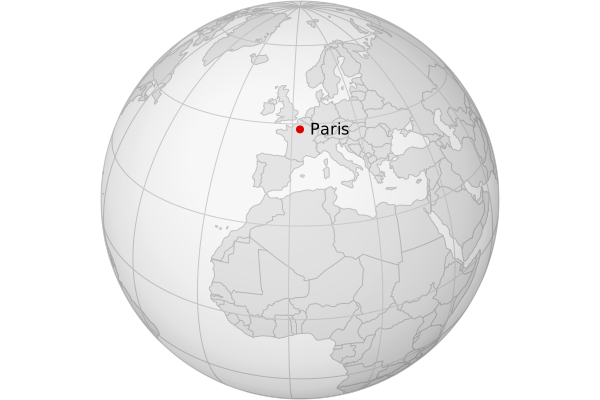
Steps
- Load country polygons (source: Natural Earth)
- Project countries using the Earth from space projection
- Simplify country borders
- Derive a line layer from the country polygons
- Add a circle so we can show a background color
- Add graticule lines
- Add a dot and a label
- Style all the layers
- Export as SVG
Code
mapshaper \
-i ne_50m_admin_0_countries.geojson name=countries \
-proj +proj=nsper +h=1e7 +lat_0=35 +lon_0=2.35 \
-simplify resolution=400 \
-lines + name=lines \
-graticule polygon name=background \
-filter true + name=shadow \
-graticule target=countries name=graticule interval=20 \
-i "lat,lon,label\n48.86,2.35,Paris" name=dot \
-points \
-proj match=countries \
-filter true + name=label \
-style target=background fill='#f7f7f7' \
-style target=shadow fill-effect=sphere fill='#ccc' \
-style target=graticule stroke='#ccc' \
-style target=countries fill='#e4e4e4' \
-style target=lines stroke='TYPE == "inner" ? "#bbb" : "#c2c2c2"' \
-style target=dot fill='#dd0000' r=4 \
-style target=label label-text=label text-anchor=start dy=5 dx=10 font-size=16 \
-target background,countries,lines,graticule,dot,label,shadow \
-o globe.svg height=400 width=600
Notes
- The PROJ string
+proj=nsper +h=1e7 +lat_0=35 +lon_0=2.35uses the near-side perspective projection (sometimes called "Earth from space") from a height of 10,000 km above the Earth. This gives a more zoomed-in appearance than the orthographic projection (+proj=ortho), which is also commonly used for globe maps. -graticule polygoncreates a polygon that matches the boundary of the graticule, to give the map a background shape.-filter true +is the Mapshaper idiom for copying a layer (the filter expression istrue, which means every feature is retained).
Assets
- Open in the web app — loads a snapshot file containing the finished map
- Download snapshot (
globe.msx) - Download source data (
globe.zip)