Map projections
Mapshaper's -proj command reprojects a dataset from one coordinate reference system (CRS) to another, using a JavaScript port of the PROJ coordinate transformation library.
Run mapshaper -projections (or just projections in the web app console) to print the full list of available projections.
Examples
# Project a Shapefile to UTM zone 11N using a PROJ string
mapshaper nevada.shp -proj +proj=utm +zone=11 -o

# Convert a projected Shapefile to WGS84 — the following are equivalent:
mapshaper nyc.shp -proj EPSG:4326 -o
mapshaper nyc.shp -proj wgs84 -o
mapshaper nyc.shp -proj +proj=longlat +datum=WGS84 -o

# Composite projection for U.S. maps with Alaska, Hawaii, and Puerto Rico insets
mapshaper us-states.shp -proj albersusa +PR -o
Forms of CRS notation
PROJ codes are sequences of +key=value parameters used by the PROJ projection system and supported by Mapshaper. You will often see PROJ codes from other sources with a large number of parameters containing default values, such as +units=m and +x_0=0 +y_0=0 — these parameters can safely be omitted.
Examples of PROJ codes for some common projections (with default values omitted)
# Lambert Conformal Conic
+proj=lcc +lat_1=33 +lat_2=45 +lat_0=39 +lon_0=-96
# Albers Equal Area Conic
+proj=aea +lat_1=29.5 +lat_2=45.5 +lat_0=23 +lon_0=-96
# Transverse Mercator
+proj=tmerc +lon_0=-75 +lat_0=0
# Orthographic
+proj=ortho +lat_0=45 +lon_0=-100
# Robinson
+proj=robin
# Mollweide
+proj=moll
# Mercator
+proj=merc
# Web Mercator
+proj=merc +a=6378137 +b=6378137
Example of using a PROJ code with the -proj command
mapshaper unprojected.shp \
-proj +proj=lcc +lat_1=33 +lat_2=45 +lat_0=39 +lon_0=-96 \
-o projected.shp
Bare projection name
You can also use a bare PROJ projection name (without +proj=) as shorthand:
mapshaper world.shp -proj robin -o
EPSG and ESRI codes are numeric CRS identifiers from the EPSG registry and from ESRI. Mapshaper supports many of them.
mapshaper data.shp -proj EPSG:3857 -o   # Web Mercator
mapshaper data.shp -proj EPSG:32611 -o  # UTM zone 11N (WGS84)
Aliases are short names for common projections. The built-in aliases are:
| Alias | Equivalent PROJ string |
|---|---|
wgs84 |
+proj=longlat +datum=WGS84 |
webmercator |
+proj=merc +a=6378137 +b=6378137 |
robinson |
+proj=robin +datum=WGS84 |
albersusa |
Composite U.S. projection (see below) |
Auto-fitted parameters
For some conic and cylindrical projections, you can supply just the projection name and Mapshaper will calculate suitable parameters from the extent of the data. This is useful when you want a locally appropriate projection without looking up specific values.
For Lambert Conformal Conic (lcc) and Albers Equal Area Conic (aea), Mapshaper calculates the central meridian (lon_0) and two standard parallels (lat_1, lat_2) using the one-sixth rule applied to the data's bounding box.
For Transverse Mercator (tmerc, etmerc), it calculates the central meridian and latitude of origin (lon_0, lat_0) from the center of the bounding box.
For Universal Transverse Mercator (utm), it calculates the UTM zone from the center longitude of the bounding box and adds +south when the center latitude is in the southern hemisphere.
# Mapshaper fills in lon_0, lat_1, lat_2 based on the data extent
mapshaper region.geojson -proj lcc -o region_lcc.geojson

# Equivalent — Mapshaper fills in lon_0 and lat_0
mapshaper region.geojson -proj tmerc -o region_tmerc.geojson

# Equivalent — Mapshaper fills in zone and hemisphere
mapshaper region.geojson -proj utm -o region_utm.geojson
When Mapshaper auto-fits parameters, it prints the expanded PROJ string so you can see exactly what was applied. An example message: Converted "lcc" to "+proj=lcc +lon_0=-95.5 +lat_1=30.17 +lat_2=44.83". You can copy this PROJ string and use it explicitly if you need reproducible output.
albersusa
albersusa is a Mapshaper-specific composite projection for maps of the United States. It applies Albers Equal Area Conic to the contiguous 48 states, then places Alaska (scaled down) and Hawaii as insets in the lower-left corner of the map.
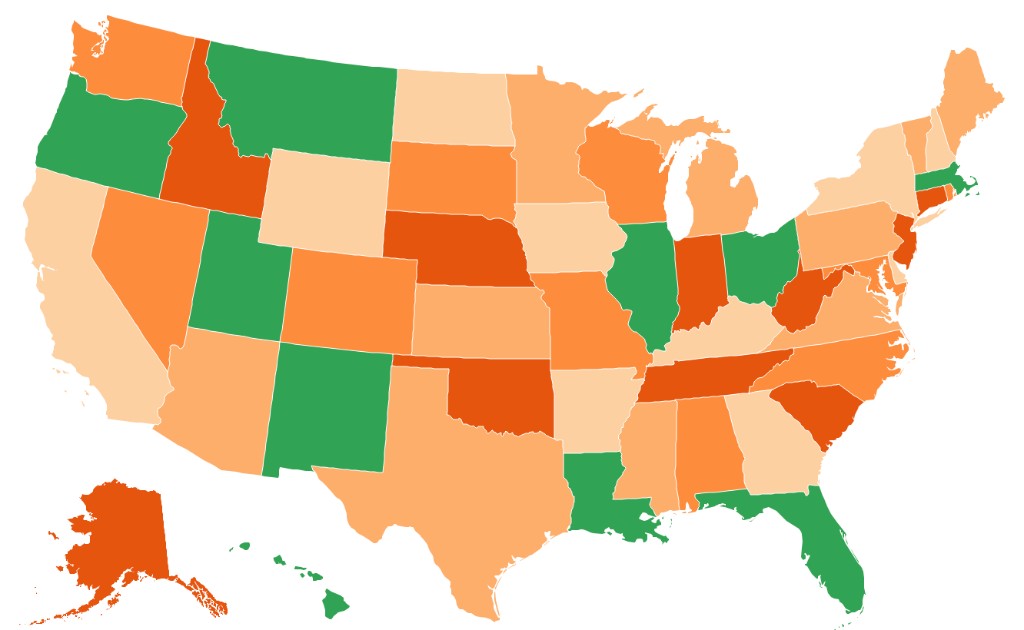
mapshaper us-states.shp -proj albersusa -o
Two optional flags add insets for outlying territories:
+PR— Puerto Rico+VI— U.S. Virgin Islands (placed alongside Puerto Rico)
mapshaper us-states.shp -proj albersusa +PR +VI -o
The position, scale, rotation, and other properties of each inset can be overridden with named parameters if the defaults do not suit your map. See the -proj reference for the full option syntax.
Interrupted and polyhedral world projections
Goode Homolosine and Mollweide projections
igh— Interrupted Goode Homolosine, land emphasisimoll— Interrupted Mollweide, land emphasisigh_o— Interrupted Goode Homolosine, ocean emphasisimoll_o— Interrupted Mollweide, ocean emphasis
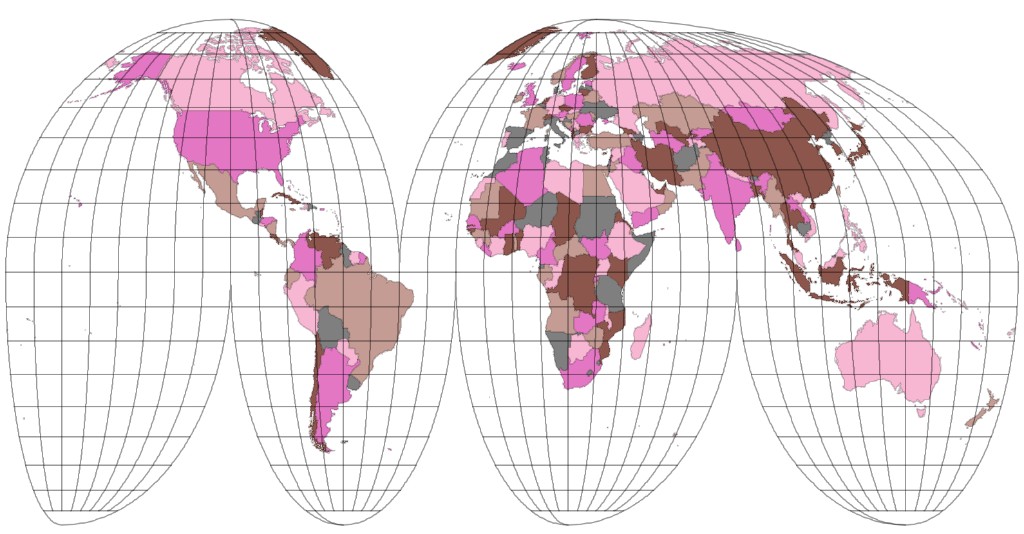
The ocean-emphasis projections default to +lon_0=-160; an explicit
+lon_0= overrides this default.
# Project world polygons using Goode Homolosine; add a graticule
mapshaper world.geojson \
  -proj +proj=igh \
  -o world-igh.geojson \
  -graticule \
  -o graticule-igh.geojson

# Create an ocean-emphasis Interrupted Mollweide layer with a neatline
mapshaper world.geojson \
  -proj +proj=imoll_o \
  -o world-imoll-o.fgb \
  -graticule outline \
  -o neatline-imoll-o.fgb
Dymaxion projections
Mapshaper includes two versions of Buckminster Fuller's Airocean (Dymaxion) world map. Both divide the globe into twenty triangles and arrange them on a flat map according to Fuller's design:
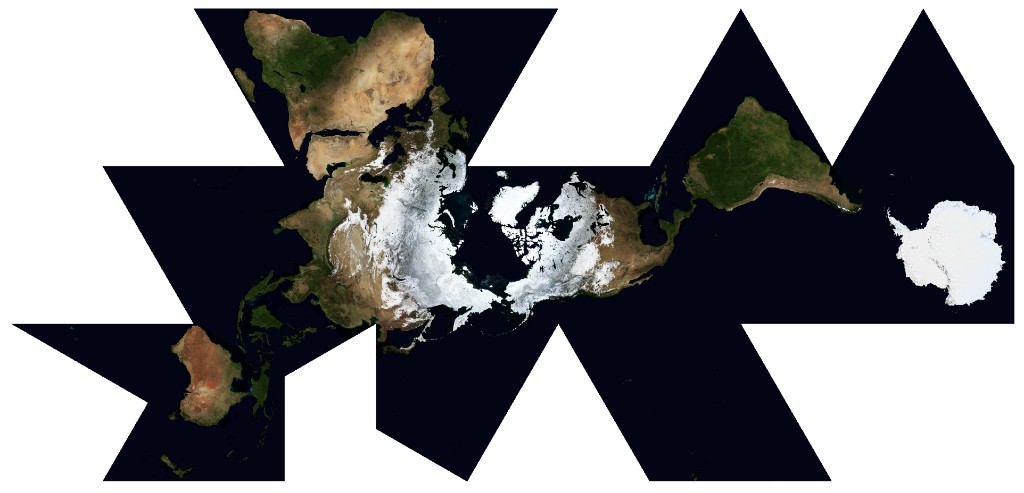
dymaxion— a version using the Gray-Fuller transform for projecting each polyhedral face, which balances shape and area distortiondymaxion2— a version using the gnomonic projection to project each face
mapshaper world.geojson \
  -proj +proj=dymaxion densify \
  -o world-dymaxion.geojson \
  -graticule outline \
  -o neatline-dymaxion.geojson
Butterfly and Cahill-Keyes projections
These projections divide the globe into eight octahedral faces. The first two arrange
the triangular faces in a butterfly layout similar to the butterfly maps of Bernard Cahill and Steve Watterman, but use Gene Keyes's facet projection; the third (cahill_keyes) uses Gene Keyes's M-shaped arrangement and facet projection.
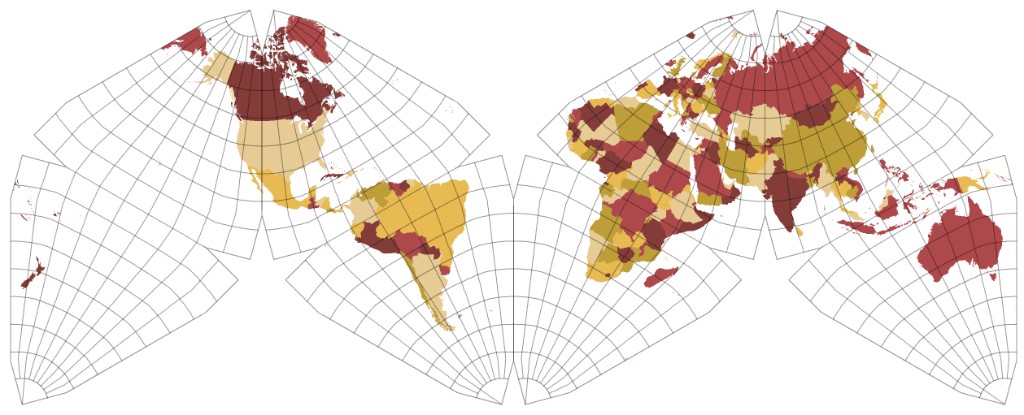
butterfly— centered on the Pacific, with a default central meridian of 157.5°Ebutterfly2— centered on the Atlantic, with a default central meridian of 20°Wcahill_keyes— Cahill-Keyes M-shaped profile, with a default central meridian of 20°W
mapshaper world.geojson \
  -proj +proj=butterfly densify \
  -o world-butterfly.geojson \
  -graticule outline \
  -o neatline-butterfly.geojson
Tetrahedral projections
These projections divide the globe into four triangles and arrange them to form a rectangular world map:
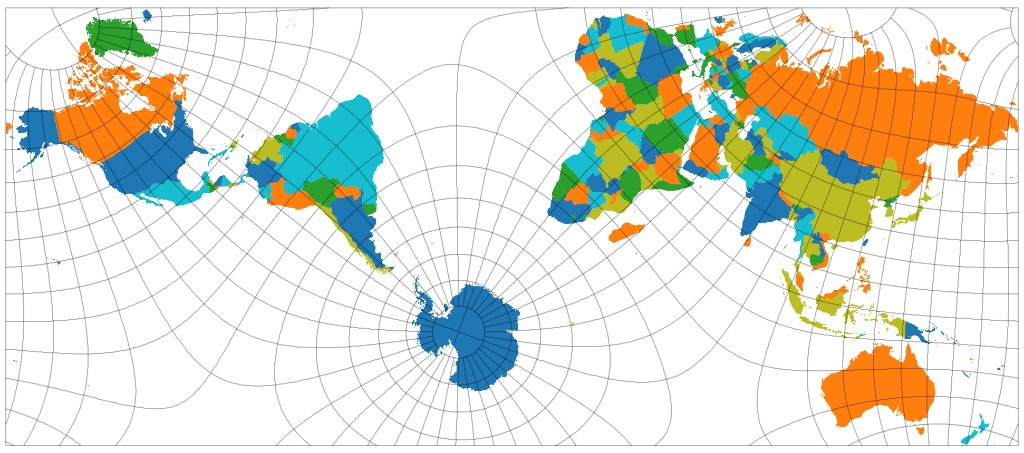
narukawa2022— Hajime Narukawa's published 2022 formulas approximating the original AuthaGraph mapcalm— Farhan Adrian's adaptation of L. P. Lee's conformal tetrahedral projection designed to match the AuthaGraph layout.markley— F. Landis Markley's adaptation of Lee's projection
mapshaper world.geojson \
  -proj +proj=markley densify \
  -o world-markley.geojson \
  -graticule outline \
  -o neatline-markley.geojson
Two-hemisphere projections
These projections show the whole world as two hemispheres, one above the other — a layout that suits world maps on phones in portrait orientation.
hemispheres— two Lambert Azimuthal Equal-Area (laea) hemisphereshemispheres2— two orthographic (ortho) hemispheres
Parameters:
+lon_0=+lat_0=— the center of the upper hemisphere. By default the upper hemisphere is centered on 70°E, so the hemispheres meet along the 20°W and 160°E meridians, like traditional Eastern and Western Hemisphere maps.+lon_1=+lat_1=— the center of the lower hemisphere. The defaults arelon_0 + 180andlat_0.+gap=— the space between the two disks, as a fraction of a disk's radius (default0, so the disks touch). A negative value makes the lower disk overlap the upper disk, hiding part of it.+horizontal— places the hemispheres side by side, with thelon_0hemisphere on the left. The right disk overlaps the left one.
Use -graticule polygon to create background polygons for the hemispheres and -graticule outline to create a neatline.
Finding CRS definitions
Several websites provide PROJ strings and EPSG codes for coordinate systems worldwide:
- EPSG.io — search by place name, CRS name, or EPSG code. Each entry shows the PROJ string and WKT definition and lets you preview the projection on a map.
- SpatialReference.org — similar database built directly from the PROJ library. Good for browsing the full set of supported systems.
- PROJ documentation — reference for every projection in PROJ, including all supported parameters. Mapshaper's JavaScript port supports most but not all of them; run
mapshaper -projectionsto see the exact list.
Coordinate system quirks and limitations
GeoJSON and TopoJSON files are assumed to use WGS84 when their bounding boxes fall within the normal range for decimal degree coordinates.
Mapshaper does not support coordinate transformations that require grid-shift files (for example, NAD27 → WGS84). If a transformation silently fails, this is the likely cause.
Projections that can only represent part of the globe — including orthographic (
ortho), near-side perspective (nsper,geos), gnomonic (gnom), stereographic (stere), and Lambert Azimuthal Equal-Area (laea) — automatically clip input data to the projection's valid extent before projecting. This prevents distorted or invalid geometry from coordinates outside the visible area.Interrupted and polyhedral projections (
igh,imoll,igh_o,imoll_o,narukawa2022,markley,calm,dymaxion,dymaxion2,butterfly,butterfly2,cahill_keyes) can be used as destinations for vector and raster layers, but cannot be used as source CRSs. The two-hemisphere projections (hemispheres,hemispheres2) can be reprojected back to other CRSs, but cannot be read from.prjfiles.For projections that introduce significant curvature along straight lines, add the
densifyoption to interpolate extra vertices along long segments:mapshaper data.shp -proj +proj=ortho +lat_0=45 +lon_0=-100 densify -oWhen
-projtargets a layer, all topologically related layers (those sharing the same geometry) are also reprojected. To reproject all layers, usetarget=*.The
init=option is available for files whose source CRS is unknown and cannot be inferred from a.prjfile. Shapefiles normally carry a.prjsidecar; GeoJSON and TopoJSON are assumed to be WGS84 when their coordinates fall within the standard lat/long range.