New York State map
Difficulty: moderate
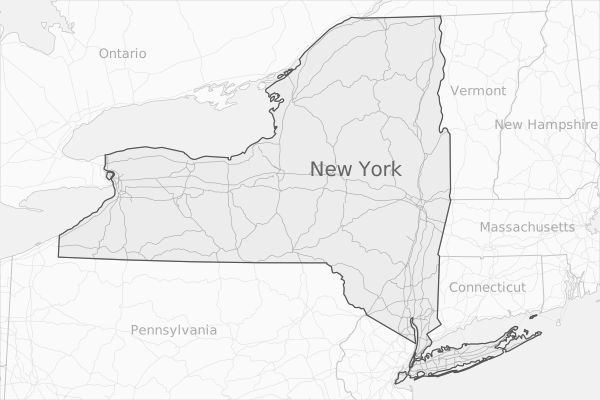
Steps
- Load states/provinces (source: Natural Earth)
- Make a layer containing just N.Y. State
- Project to Lambert Confirmal Conic
- Create a rectangular frame around N.Y.
- Clip the states to the frame
- Derive label points from the states/provinces
- Extract lines from the states/provinces
- Load roads (source: Natural Earth)
- Project and clip
- Divide the roads at the N.Y. border (for styling)
- Style all the layers
- Export as SVG
Code
mapshaper \
  -i usa_can_admin1_lakes.geojson name=states \
  -filter 'name == "New York"' + name=NY \
  -proj lcc densify \
  -frame height=400 width=600 offset=4% name=rectangle \
  -target states \
  -clip rectangle \
  -each 'labelled = this.area > 1e10' \
  -points inner + name=labels \
  -filter labelled \
  -target states \
  -lines + name=borders \
  -i usa_can_roads.geojson name=roads \
  -proj match=NY \
  -clip rectangle \
  -divide NY \
  -style target=labels label-text=name dy=4 fill='#aaa' font-size=13px \
  -style target=labels fill='#666' font-size=20px where='name=="New York"' \
  -style target=roads stroke='name=="New York" ? "#aaa" : "#e2e2e2"' stroke-width=0.6 \
  -style target=states fill='name=="New York" ? "#ececec" : "#fafafa"' \
  -style target=borders stroke='#c5c5c5' stroke-width='TYPE=="inner" ? 1 : 0.7' \
  -style target=NY stroke='#555' stroke-width=1.2 \
  -style target=rectangle fill='#f1f1f1' \
  -target rectangle,states,roads,borders,NY,labels \
  -o ny-state.svg
Notes
-proj lcc densify: Lambert Conformal Conic requires additional parameters. When justlccis given, Mapshaper calculates reasonable parameters using the bounding box of the targeted layer(s). Thedensifyoption adds additional vertices when the projection needs to create curved lines from long straight-line segments.-each 'labelled = this.area > 1e10': This command creates a variable namedlabelledwhich is false if the area of a polygon in the states layer is less than 1e10 square meters (10,000 square kilometers).-divide NY: this command uses the NY polygon (the N.Y. State border) to divide roads at the polygon boundary and adds the NY layer's attribute data to the roads that fall inside the polygon.
Assets
- Open in the web app — loads a snapshot file containing the finished map
- Download snapshot (
ny-state.msx) - Download source data (
ny-state.zip)